

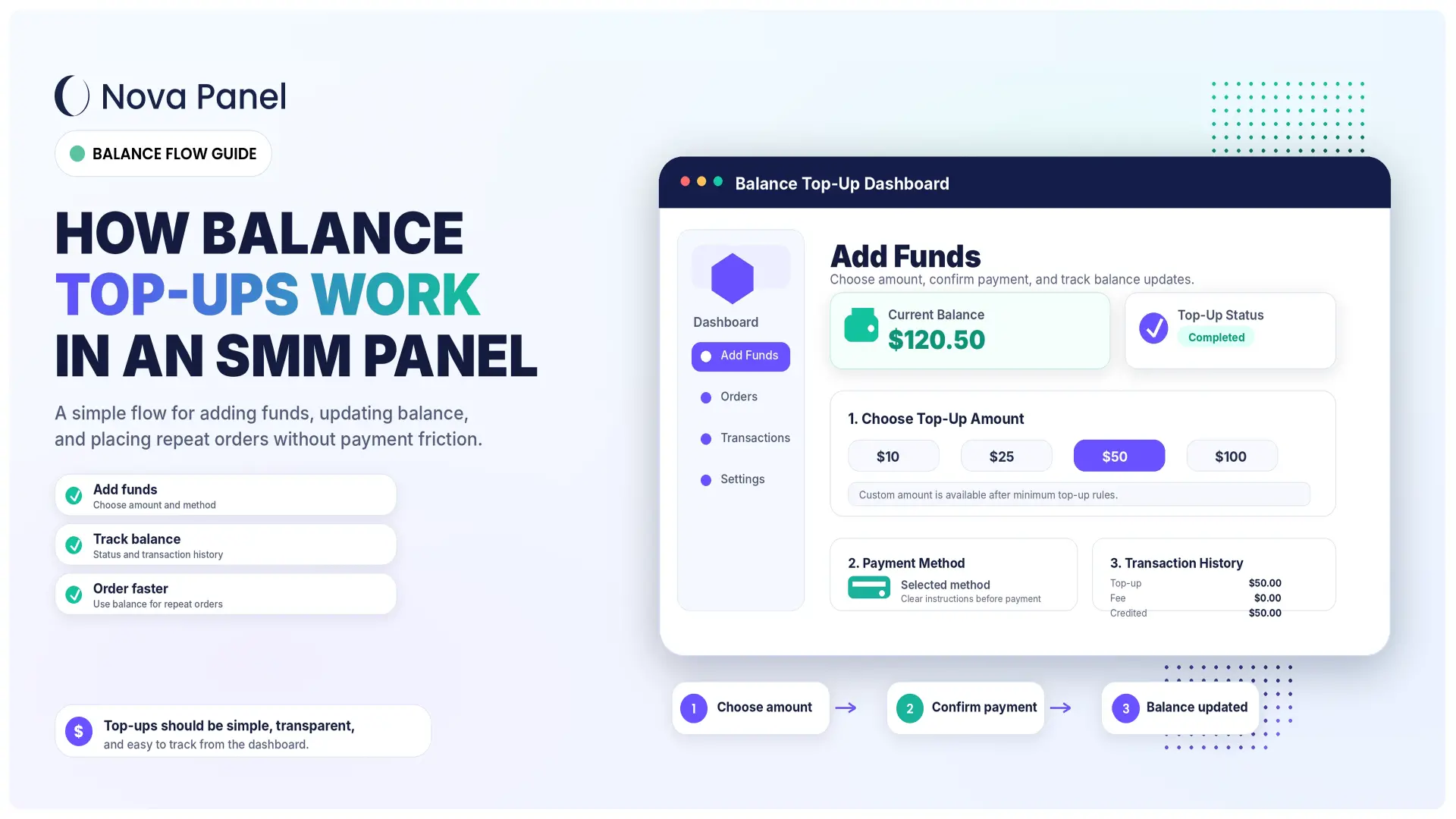
How Balance Top-Ups Work in an SMM Panel
Balance top-ups are one of the most important parts of an SMM panel.
For customers, the balance system makes ordering easier. They add funds once, then use their account balance to place multiple orders without paying separately every time.
For the panel owner, balance top-ups help organize payments, reduce friction, simplify repeat purchases, and make the business feel more professional.
A balance system may look simple from the outside, but it affects many parts of the SMM panel experience:
- customer trust
- payment flow
- order conversion
- repeat purchases
- refund handling
- support workload
- pricing strategy
- business cash flow.
If the top-up process is clear, users feel more confident. If it is confusing, users may hesitate before adding funds or leave the platform completely.
In this guide, we will explain how balance top-ups work in an SMM panel, why they matter, what customers expect, what owners should control, and how Nova Panel helps create a more organized payment and balance experience.
What Is a Balance Top-Up in an SMM Panel?
A balance top-up is the process of adding funds to a customer’s account inside an SMM panel.
Instead of paying separately for every order, the customer adds money to their internal account balance. Then they use that balance to pay for services inside the platform.
For example:
- A customer creates an account.
- The customer adds funds to their balance.
- The balance appears in the dashboard.
- The customer chooses a service.
- The order cost is deducted from the balance.
- The customer can continue ordering until the balance runs low.
In simple terms, the balance works like an internal wallet for the panel.
It is not the same as a bank account or external payment account. It is a platform balance used inside the SMM panel to place orders and manage spending.
This makes the order process faster and easier, especially for repeat customers.
Why SMM Panels Use a Balance System
A balance system is useful because many SMM panel orders are small, repeated, or frequent.
If customers had to pay separately for every order, the process would be slower and less convenient.
A balance system makes the process easier.
The user adds funds once, then places orders from the balance.
For the customer, it means:
- faster ordering
- easier repeat purchases
- less payment friction
- clearer spending control
- one dashboard for balance and orders.
For the panel owner, it means:
- smoother payment management
- fewer tiny payment transactions
- better customer retention
- simpler refund or partial credit handling
- more predictable ordering behavior.
A good balance system makes the panel feel like a real platform, not just a simple checkout page.
How the Standard Balance Top-Up Flow Works
A typical SMM panel balance top-up flow follows a simple process.
Step 1: The User Opens the Add Funds Page
After logging in, the customer goes to an area usually called:
- Add Funds
- Top Up Balance
- Deposit
- Balance Top-Up
- Add Balance.
This page should be easy to find from the dashboard.
If users cannot quickly find where to add funds, they may leave before placing an order.
A good SMM panel should make the balance area visible and simple.
Step 2: The User Chooses a Top-Up Amount
Next, the user chooses how much they want to add.
The panel may allow:
- custom top-up amounts
- fixed top-up options
- minimum top-up rules
- different amounts for different payment methods.
For example, a panel may offer quick options such as:
- $10
- $25
- $50
- $100.
Fixed options can make the process faster because the user does not need to think too much.
A custom amount can also be useful for users who know exactly how much they want to add.
The important thing is clarity.
The customer should understand:
- minimum top-up amount
- maximum top-up amount, if relevant
- supported currency
- whether fees apply
- how much balance they will receive.
Step 3: The User Selects a Payment Method
After choosing the amount, the user selects a payment method.
The available methods depend on the business, region, and payment setup.
The panel should explain the payment options clearly without overwhelming the user.
For each method, it is useful to show:
- payment name
- processing time
- fee information, if applicable
- minimum amount
- important instructions
- what happens after payment.
If payment instructions are unclear, users may make mistakes.
Mistakes can create support tickets, delayed balance updates, and trust issues.
A clean payment flow reduces confusion.
Step 4: The User Confirms the Payment
Once the user selects the amount and payment method, they confirm the top-up.
At this step, the panel should show a clear summary:
- top-up amount
- payment method
- fee, if any
- final balance amount
- payment instructions
- confirmation button.
Before the user pays, they should know exactly what will happen.
This is especially important because balance top-ups involve trust. The customer is adding money before placing an order.
A clear confirmation step helps users feel more confident.
Step 5: The Payment Is Processed
After the user confirms the top-up, the payment is processed.
Depending on the payment setup, this may happen:
- instantly
- after payment confirmation
- after manual review
- after the payment provider confirms the transaction.
Not every payment method works the same way.
Some methods may update the balance quickly. Others may require additional checks or manual confirmation.
The panel should communicate this clearly.
For example:
“Your payment is being processed. Your balance will update after confirmation.”
This type of message helps reduce support questions.
Step 6: The Balance Is Updated
Once the payment is confirmed, the user’s balance is updated inside the dashboard.
The customer should be able to see:
- current balance
- top-up amount
- transaction status
- transaction history
- date and time of top-up.
A visible balance update gives users confidence that the payment was received.
If the balance does not update immediately, the panel should show a clear status such as:
- Pending
- Processing
- Completed
- Failed
- Canceled.
Good balance status communication reduces anxiety and support tickets.
Step 7: The User Places Orders From the Balance
After the balance is updated, the user can place orders.
When they submit an order, the order cost is deducted from their balance.
For example:
- Current balance: $50.00
- Order cost: $7.50
- New balance: $42.50
The panel should show the final order cost before the customer submits the order.
This helps users avoid surprises.
A good order flow should always make the balance deduction clear.
Why Balance Top-Ups Improve the Customer Experience
Balance top-ups make the customer experience smoother.
A user does not need to go through payment steps for every order.
Instead, they can focus on choosing services and placing orders.
This is especially helpful for:
- resellers
- agencies
- repeat customers
- users who place many small orders
- customers who manage multiple requests.
A balance system can improve the experience in several ways.
Faster Repeat Orders
Once the balance is available, the user can place orders faster.
This reduces friction and encourages repeat usage.
A customer who has to pay every time may hesitate.
A customer with available balance can order more easily.
Easier Spending Control
A balance system helps users see how much money they have available.
They can check:
- current balance
- top-up history
- order spending
- refunds or credits
- remaining funds.
This gives the user a clearer sense of control.
Fewer Payment Interruptions
If the user has enough balance, they can place orders without leaving the order flow.
This makes the panel feel faster and more convenient.
A smoother experience can increase customer retention.
Better Experience for Resellers
Resellers often place multiple orders for different clients or projects.
For them, balance top-ups are especially useful.
Instead of paying for each order separately, they can add a larger balance and manage repeat orders more efficiently.
This is one reason balance systems are common in SMM panels.
Balance Top-Up vs Direct Payment Per Order
Some businesses use direct payment per order. Others use a balance system.
For SMM panels, a balance system is usually more practical.
| Factor | Direct Payment Per Order | Balance Top-Up System |
|---|---|---|
| Payment frequency | Every order | Add funds once, order multiple times |
| Repeat ordering | Slower | Faster |
| Small orders | Less convenient | More convenient |
| Payment fees | Can be higher per order | Easier to manage |
| Customer dashboard | Less important | More useful |
| Refund handling | More complex | Can be handled as balance credit |
| Best for | One-time purchases | Repeat orders and panel users |
Direct payment can work for simple one-time services.
But SMM panels usually benefit from account balance because customers often place more than one order.
The balance system turns the panel into a repeat-use platform.
What Customers Expect From a Balance Top-Up Page
A good top-up page should be simple and trustworthy.
Customers usually expect to see:
- current balance
- clear top-up form
- supported payment methods
- minimum top-up amount
- payment instructions
- processing time
- fee information
- transaction history
- support contact
- status of recent payments.
The page should not feel confusing.
A user should not need to ask support basic questions such as:
- How do I add funds?
- What is the minimum deposit?
- How long does it take?
- Where did my payment go?
- Why is my balance not updated?
- What happens if payment fails?
The more clearly your top-up page answers these questions, the fewer support tickets you will receive.
Common Balance Top-Up Statuses
Balance top-ups should have clear statuses.
Common statuses may include:
- Pending
- Processing
- Completed
- Failed
- Canceled
- Refunded.
Each status should have a simple meaning.
Pending
The payment request was created, but the payment has not been confirmed yet.
This may happen when the user has started the process but the system is waiting for payment confirmation.
Processing
The payment is being checked or processed.
This status is useful when the payment method does not confirm instantly.
Completed
The payment was confirmed and the balance was added to the user account.
This is the status users want to see.
Failed
The payment did not go through.
The user may need to try again or contact support.
Canceled
The payment request was canceled or expired.
This can happen if the user starts a top-up but does not complete payment.
Refunded
The payment was returned or credited back according to the platform’s rules.
Refund rules should be clearly explained in your Terms or payment policy.
Why Minimum Top-Up Amounts Matter
Minimum top-up amounts are important for business sustainability.
If users add very small amounts, payment fees can reduce your margin.
For example, a fixed payment fee may be small on a larger top-up but expensive on a tiny one.
A minimum top-up can help you:
- reduce payment fee impact
- avoid too many tiny transactions
- improve cash flow
- encourage repeat orders
- make balance management cleaner
- reduce admin workload.
The minimum amount should be reasonable.
If it is too high, new users may hesitate.
If it is too low, fees and support costs may hurt profitability.
The right minimum depends on your business model, customer type, payment methods, and pricing strategy.
A reseller-focused panel may use higher minimums.
A beginner-friendly panel may keep the entry amount lower.
The key is balance.
You need to protect your margins without creating unnecessary friction.
How Payment Fees Affect Balance Top-Ups
Payment fees can affect the real value of each top-up.
Some payment methods may include:
- percentage fee
- fixed fee
- currency conversion cost
- settlement delay
- chargeback or dispute risk
- manual confirmation work.
Panel owners should not ignore these costs.
If you allow users to add very small amounts but the payment fee is significant, your real profit may be weaker than expected.
You can handle payment fees in different ways:
- include fees in your pricing
- set minimum top-up amounts
- show fees clearly during payment
- offer different minimums by payment method
- review payment methods regularly.
The most important rule is transparency.
If users see one amount but receive a different balance without explanation, they may lose trust.
Always make the final credited amount clear before the user confirms payment.
How Refunds and Partials Connect to Balance
Balance systems can make refunds and partial orders easier to manage.
In some cases, instead of sending money back through the original payment method, a panel may issue balance credit according to its rules.
For example:
- an order is partial
- a service is unavailable
- an order is canceled
- a correction is needed
- the platform decides to return credit to the user balance.
The panel should clearly explain how this works.
Users should understand:
- when balance credit may be issued
- whether refunds go to account balance or original payment method
- how partial orders are calculated
- whether unused balance can be withdrawn
- what rules apply to promotional credits
- how to contact support if something looks wrong.
Clear refund and balance rules prevent misunderstandings.
Do not hide these rules.
A transparent policy builds trust.
Customer Balance vs Provider Balance
Panel owners should understand the difference between customer balance and provider balance.
These are not the same thing.
Customer Balance
Customer balance is the amount available in the user’s account inside your SMM panel.
The customer uses this balance to place orders.
Example:
- Customer adds $50.
- Customer places a $10 order.
- Customer balance becomes $40.
Provider Balance
Provider balance is the operational balance the panel owner may need with external providers or service sources to process orders.
Example:
- Customer adds funds to your panel.
- Customer places an order.
- Your panel may need enough operational balance or provider capacity to process the order.
- If provider balance is too low, orders may fail or be delayed.
This is important for owners.
Even if customers have balance inside your panel, you still need to manage the operational side of fulfillment.
A good owner monitors both:
- customer balances
- provider or operational balances.
Confusing these two can lead to order problems.
How Balance Top-Ups Affect Cash Flow
Balance top-ups can improve cash flow because customers add funds before placing orders.
This can be helpful for an SMM panel business, but it also creates responsibility.
The customer expects that their balance will be available and usable.
Panel owners should manage balance carefully and maintain clear records.
Good balance management includes:
- accurate transaction history
- clear top-up statuses
- reliable balance deductions
- visible order costs
- refund or credit logs
- admin visibility
- support process for payment questions.
Balance is not just a number on the dashboard.
It is part of the trust relationship between the customer and the platform.
If balance records are unclear, users may lose confidence.
How to Make Balance Top-Ups More Trustworthy
Trust is essential when users add funds to a platform.
You can improve trust by making the top-up process transparent and predictable.
Important trust elements include:
- clear payment instructions
- visible current balance
- transaction history
- clear status updates
- support contact
- FAQ
- Terms of Service
- refund and balance policy
- secure account access
- professional dashboard design
- consistent branding.
The user should never feel lost after making a payment.
After a top-up attempt, they should know:
- whether the payment was received
- whether it is pending
- when balance may update
- what to do if there is a problem.
The more predictable the process feels, the more likely users are to add funds again.
Common Balance Top-Up Mistakes
Balance top-ups can create problems if they are not designed carefully.
Here are common mistakes to avoid.
Mistake 1: Hiding Fees
If fees apply, explain them clearly.
Customers should understand how much they pay and how much balance they receive.
Hidden fees damage trust.
Mistake 2: No Minimum Top-Up Strategy
Without minimum top-up rules, small transactions can reduce profitability.
Set minimums carefully based on payment fees and customer behavior.
Mistake 3: Unclear Payment Instructions
If users do not understand how to complete payment, they may make mistakes or contact support.
Instructions should be simple and visible.
Mistake 4: No Transaction History
Users should be able to see their top-up history.
Without transaction records, payment questions become harder to resolve.
Mistake 5: Slow or Unclear Status Updates
If a payment is pending, the user should know.
If it failed, the user should know.
Unclear statuses create anxiety and support tickets.
Mistake 6: Confusing Refund Rules
Refund and balance credit rules should be easy to find.
If users do not understand what happens after a canceled or partial order, disputes may increase.
Mistake 7: Making Balance Hard to Find
The current balance should be visible in the dashboard.
If users cannot quickly see their balance, the panel feels less organized.
Mistake 8: Not Monitoring Payment Issues
Even with automation, payment issues can happen.
Panel owners should monitor failed payments, delayed confirmations, unusual activity, and repeated support questions.
Best Practices for SMM Panel Balance Top-Ups
A strong balance top-up flow should be simple, transparent, and easy to manage.
Here are practical best practices.
1. Show Current Balance Clearly
The user should always be able to see their current balance.
Place it in the dashboard and on the top-up page.
2. Explain the Top-Up Process
Tell users how the process works.
For example:
- Choose amount.
- Select payment method.
- Complete payment.
- Wait for confirmation.
- Balance updates.
- Start ordering.
Simple explanations reduce confusion.
3. Use Clear Top-Up Statuses
Use statuses like Pending, Processing, Completed, Failed, and Canceled.
Avoid technical wording that customers may not understand.
4. Show Transaction History
A transaction history helps users and support teams.
It should include:
- date
- amount
- payment method
- status
- credited balance
- transaction reference, if available.
5. Make Fees and Minimums Transparent
If there is a minimum top-up amount, show it clearly.
If a fee applies, show it before payment.
Users should not be surprised after payment.
6. Keep Payment Rules Easy to Find
Your payment and balance rules should be easy to access.
Include them in:
- FAQ
- Terms of Service
- payment page
- support documentation.
7. Protect User Accounts
Balance is connected to account trust.
Encourage secure login practices, protect admin access, and make account settings easy to manage.
A good balance system should be supported by good account security habits.
8. Review Top-Up Data Regularly
Panel owners should review top-up behavior.
Track:
- most used payment methods
- average top-up amount
- failed payment rate
- pending payment rate
- repeat top-ups
- support questions
- top-up to order conversion.
This data helps improve the payment flow over time.
How Nova Panel Helps With Balance Top-Ups
Nova Panel is designed to help entrepreneurs launch and manage an SMM panel without building the full system from scratch.
Balance top-ups are only one part of the platform experience.
A strong SMM panel also needs:
- customer dashboard
- service catalog
- order management
- payment flow
- user accounts
- account settings
- clear balance visibility.
Nova Panel helps provide the structure for these core areas, so panel owners can focus more on business growth, service organization, pricing, support, and customer experience.
With a more organized platform foundation, users can better understand how to add funds, place orders, track statuses, and manage their account.
A clear balance and payment flow can help make the panel feel more professional and easier to use.
Nova Panel gives you the tools to launch and manage your own SMM panel without building everything from scratch.
Final Thoughts
Balance top-ups are a key part of the SMM panel experience.
They make repeat ordering easier for customers and help owners manage payments more efficiently.
But a balance system needs to be clear.
Users should understand how to add funds, which payment methods are available, when the balance updates, what fees may apply, and what happens if an order is canceled or partial.
A strong top-up flow should be:
- simple
- transparent
- easy to find
- clearly explained
- connected to transaction history
- supported by clear rules
- designed for repeat customers.
The goal is not only to accept payments.
The goal is to create a payment and balance experience that customers can understand, trust, and use again.
Nova Panel gives you the tools to manage balance top-ups, orders, users, services, and payment flow without building everything from scratch.
FAQ
What is a balance top-up in an SMM panel?
A balance top-up is the process of adding funds to a customer account inside an SMM panel. The user can then spend that balance on services inside the platform.
Why do SMM panels use account balance?
SMM panels use account balance because customers often place repeat orders. Adding funds once and ordering from balance is faster and more convenient than paying separately for every order.
How does a balance top-up work?
A user chooses a top-up amount, selects a payment method, confirms payment, waits for processing if needed, and then sees the updated balance in their dashboard.
What happens if a balance top-up is pending?
A pending status usually means the payment request was created but has not been confirmed yet. The user may need to wait for processing or contact support if the status does not change.
Should an SMM panel have a minimum top-up amount?
In many cases, yes. Minimum top-up amounts can help reduce payment fee impact, avoid tiny transactions, and make balance management more sustainable.
Can refunds be added back to account balance?
Depending on the platform rules, refunds, partial credits, or canceled order credits may be returned to the user’s account balance. The panel should clearly explain how this works.
What is the difference between customer balance and provider balance?
Customer balance is the money available in the user’s account inside your panel. Provider balance is the operational balance the panel owner may need with providers or service sources to process orders.
How can Nova Panel help with balance top-ups?
Nova Panel gives you the structure to manage key parts of an SMM panel, including customer dashboards, balance top-ups, orders, payment flows, services, users, and account settings.