

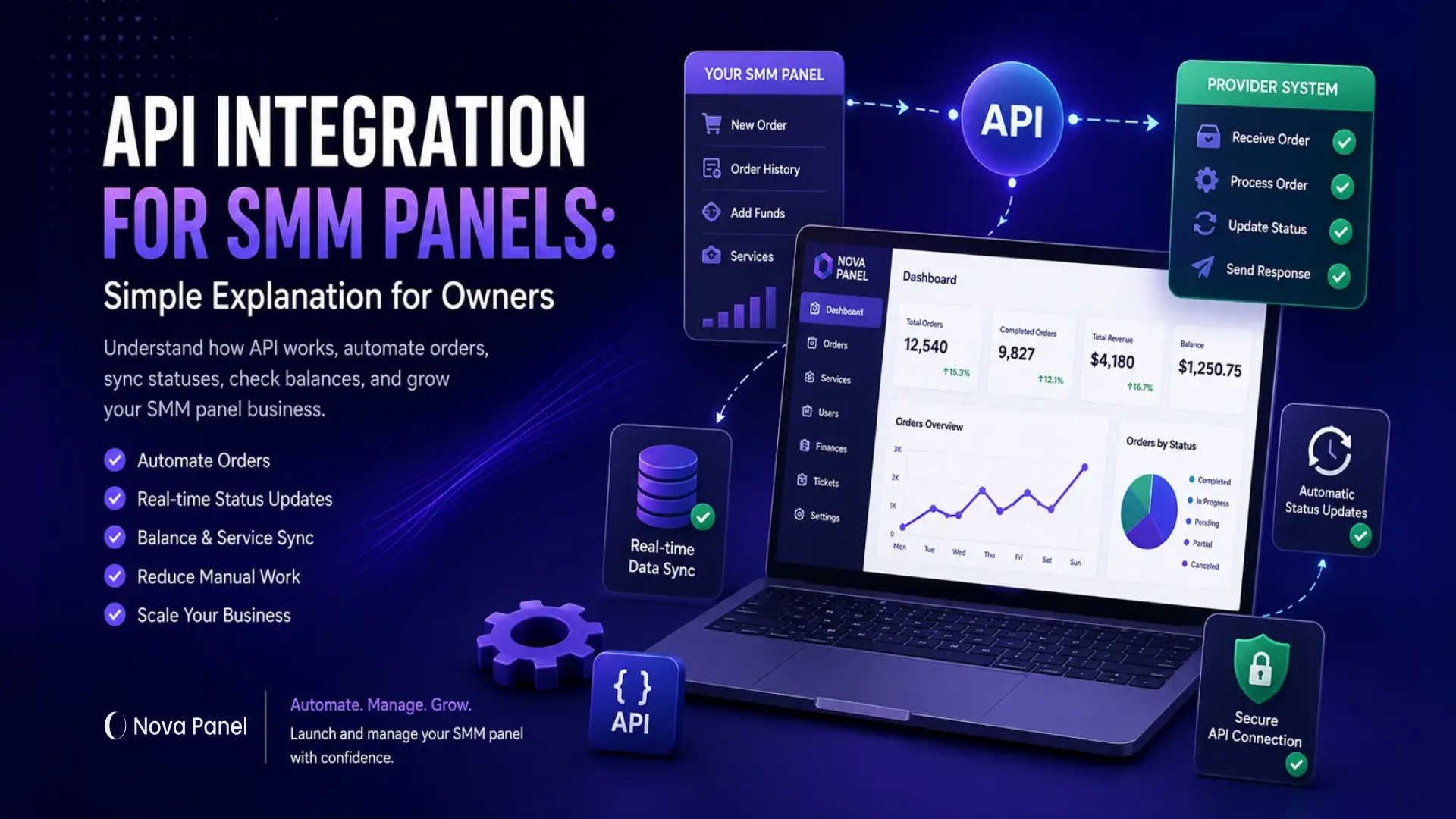
API Integration for SMM Panels: Simple Explanation for Owners
API integration may sound technical at first.
For many SMM panel owners, the word “API” feels like something only developers should understand. But if you run an SMM panel business, you do not need to become a programmer to understand why API integration matters.
You only need to understand the business logic.
An API helps your SMM panel communicate with another system. In simple terms, it allows your panel to send orders, receive updates, check balances, and automate repetitive actions without doing everything manually.
For an SMM panel owner, API integration is mainly about one thing:
automation.
Without API integration, you may need to manually copy order details, send them to another provider, check progress, update statuses, and answer customer questions one by one.
With API integration, many of these actions can happen automatically.
In this guide, we will explain what API integration means for SMM panels, how it works, what benefits it brings, what risks to avoid, and what owners should know before connecting providers.
What Is an API in Simple Words?
API stands for Application Programming Interface.
That sounds complicated, but the idea is simple.
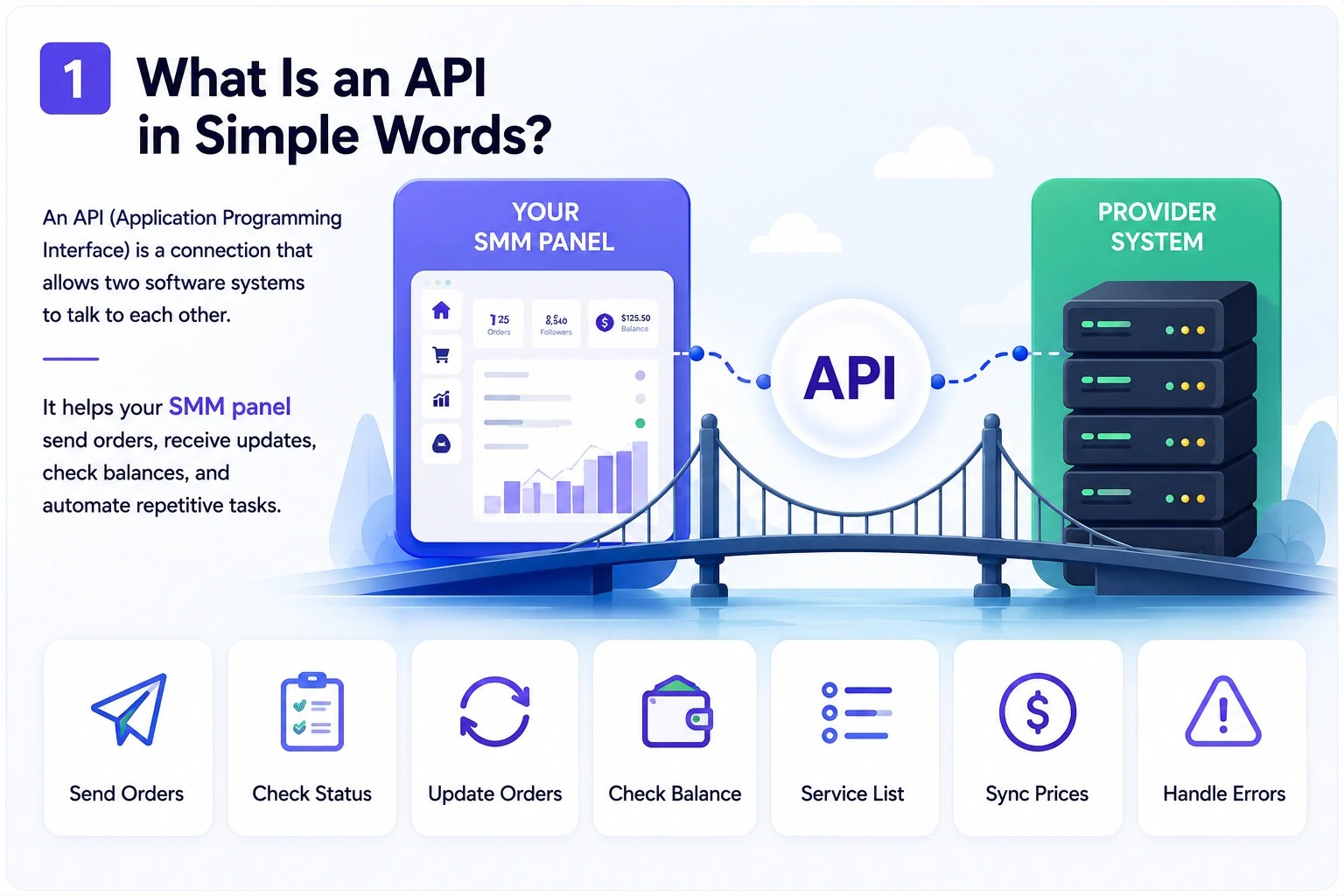
An API is a connection that allows two software systems to talk to each other.
For example, your SMM panel may need to send an order to an external provider system. Instead of doing this manually, your panel sends structured information through an API. The receiving system processes the request and sends a response back.
In an SMM panel business, an API can help with actions such as:
- sending new orders
- checking order status
- updating completed orders
- checking provider balance
- receiving service lists
- syncing prices
- managing technical errors
- reducing manual work.
Think of an API as a digital bridge.
On one side, you have your SMM panel dashboard.
On the other side, you have another system or provider.
The API is the bridge that allows them to exchange data.
Why API Integration Matters for SMM Panels
An SMM panel is not just a static landing page with a list of services.
It is a working platform that may include:
- user accounts
- service catalog
- customer balance
- payment flow
- order form
- order history
- order statuses
- admin tools
- provider connections.
When your business is small, manual work may seem manageable.
You can receive orders, copy information, send requests manually, check statuses, and update customers yourself.
But as order volume grows, manual work becomes a bottleneck.
Without automation, you may face problems such as:
- lost or miscopied order details
- slow status updates
- repeated customer questions
- incorrect order information
- delayed order processing
- too much time spent on routine tasks
- difficulty scaling operations.
API integration helps reduce these problems.
It transforms the order workflow from a series of manual steps into a more structured and automated process.
You still need pricing, positioning, service quality control, support, and customer trust. But API integration can make daily operations much more organized.
How API Integration Works in an SMM Panel
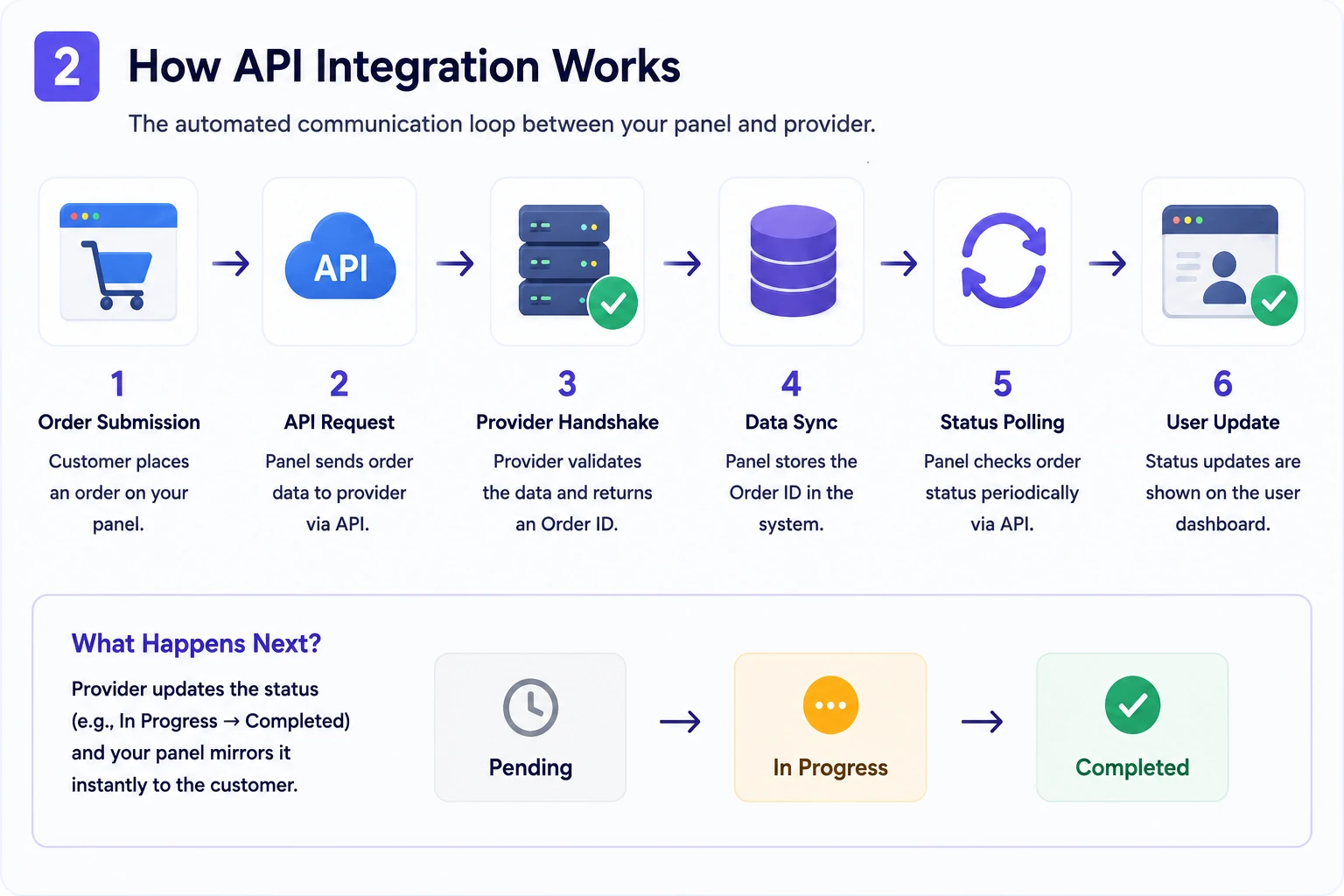
The automated communication between your panel and another system usually happens behind the scenes.
A simplified API-based order process may look like this:
- A customer selects a service inside your dashboard.
- The customer enters the required details and submits the order.
- Your panel prepares the order data.
- The panel sends that data through the API.
- The provider system receives the request.
- The provider system validates the request.
- The provider returns an order ID or an error message.
- Your panel stores the order ID.
- The panel checks the order status later.
- The customer sees status updates inside their dashboard.
From the customer’s point of view, the process feels simple.
They place an order and track the status.
Behind the scenes, the panel and provider system may exchange information automatically.
This is why API integration matters: it turns manual order handling into a structured workflow.
Example: Manual Process vs API-Based Process
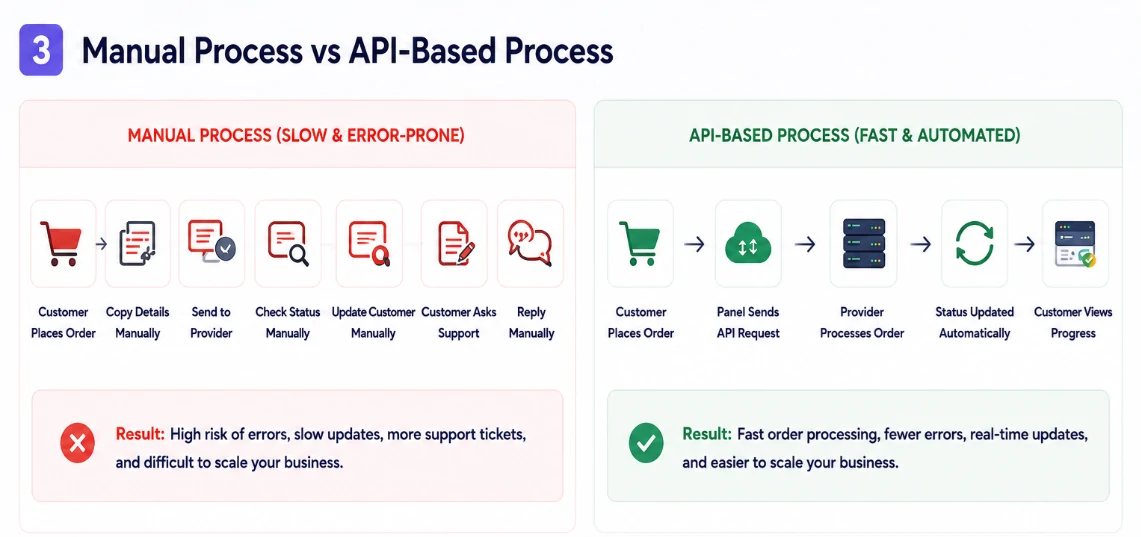
To understand the value of API integration, compare a manual process with an API-based process.
The Manual Process
Without API integration, the process may look like this:
- Customer places an order.
- Owner checks the order manually.
- Owner copies the link, quantity, and service details.
- Owner sends the information to a provider manually.
- Owner checks the provider system for updates.
- Owner updates the order status manually.
- Customer asks support for progress.
- Owner replies manually.
This may work for a small number of orders, but it becomes difficult as the business grows.
Manual processing increases the risk of mistakes, delays, and support pressure.
The API-Based Process
With API integration, the process can look like this:
- Customer places an order.
- The panel sends the order through the API.
- The provider system returns an order ID.
- The panel stores the order details.
- The panel checks or receives status updates.
- The customer tracks progress from the dashboard.
- The owner monitors exceptions instead of processing every order manually.
The difference is clear.
Manual work forces the owner to stay involved in every small action.
API integration helps the owner manage the system instead of manually moving every order from one place to another.
Key Parts of an SMM Panel API Integration
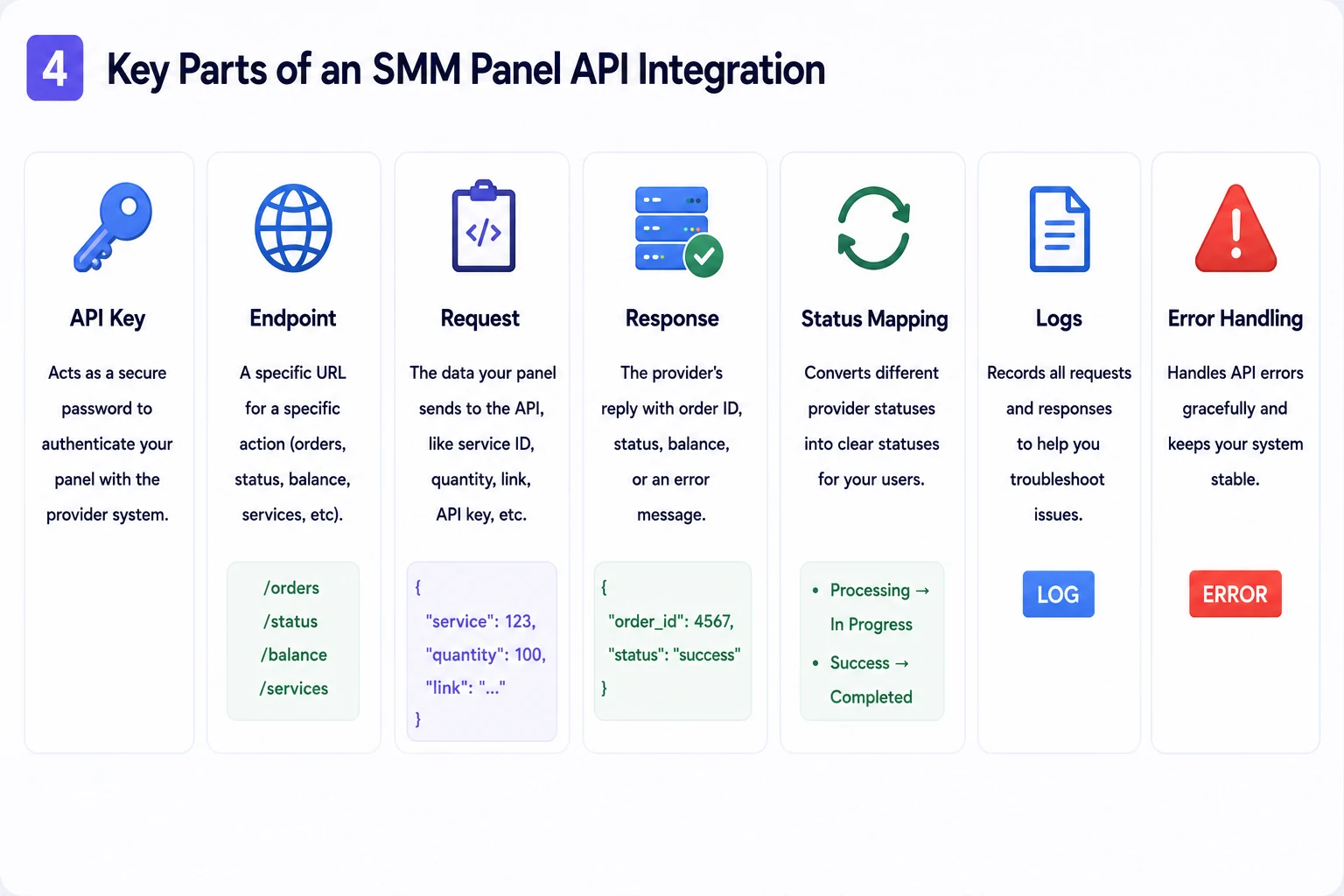
You do not need to write the code yourself, but it is useful to understand the core parts of an API integration.
These terms will help you communicate with developers, providers, or platform support teams more clearly.
1. API Key
An API key is like a password for system-to-system communication.
It allows your SMM panel to connect with another system and confirm that the request is coming from an approved account.
The API key tells the provider:
“This request is coming from an authorized panel.”
API keys should be protected carefully.
Do not share them publicly.
Do not place them in visible website code.
Do not send them casually in open chats.
Do not give them to people who do not need access.
If someone gets access to your API key, they may be able to send requests through your account.
For an SMM panel owner, API key security is very important.
2. Endpoint
An endpoint is a specific API address used for a specific action.
For example, one endpoint may be used to create orders. Another endpoint may be used to check order status. Another may be used to check balance.
In simple terms:
- one endpoint sends orders
- one endpoint checks order status
- one endpoint checks balance
- one endpoint retrieves services.
You can think of endpoints as doors.
Each door leads to a different function.
3. Request
A request is the information your panel sends through the API.
For example, when a customer places an order, your panel may send details such as:
- API key
- service ID
- quantity
- link or target input
- customer order reference
- additional required fields.
The request must be formatted correctly.
If the request is missing important information, the provider system may reject it.
This is why clear service rules and correct input fields are important inside the panel.
4. Response
A response is the information the provider system sends back.
For example, after your panel sends an order, the provider may return:
- order ID
- success message
- error message
- current status
- balance information
- service information.
Your panel needs to understand this response and show the right result to the customer or admin.
A good integration does not only send orders.
It also handles responses properly.
5. Status Mapping
Different systems may use different words for order statuses.
For example, one provider may use:
- Processing
- Finished
- Success
- Canceled
- Partial.
Another provider may use slightly different names.
Status mapping means translating provider statuses into clear statuses inside your panel.
For customers, the status should be simple and consistent.
Common customer-facing statuses may include:
- Pending
- In Progress
- Completed
- Partial
- Canceled.
Good status mapping reduces confusion and makes the panel feel more professional.
6. Logs
Logs are records of what happened inside the system.
For API integration, logs can show:
- when an order was sent
- what request was sent
- what response came back
- whether an error happened
- which provider was used
- what status was returned
- when the status was updated.
Logs are important because they help you investigate problems.
If an order fails, you need to know why.
Without logs, troubleshooting becomes guesswork.
7. Error Handling
Not every API request will work perfectly.
Sometimes a provider may return an error.
Errors can happen because:
- the API key is wrong
- provider balance is too low
- the service ID is incorrect
- the customer entered the wrong link format
- the quantity is outside the allowed range
- the provider system is temporarily unavailable
- the request is missing required information.
Good error handling means the system can deal with problems clearly.
Instead of showing confusing technical errors to customers, the panel should show a simple message or mark the order for admin review.
Error handling is one of the most important parts of a reliable API integration.
API Integration vs Manual Order Management
Here is a simple comparison.
| Factor | Manual Management | API Integration |
|---|---|---|
| Setup complexity | Lower | Higher initial setup |
| Daily workload | Grows with order volume | Lower for routine tasks |
| Order speed | Depends on human availability | Faster and more structured |
| Human error risk | Higher | Lower when configured correctly |
| Scaling potential | Limited | Better for growing panels |
| Status updates | Manual | Automated or semi-automated |
| Troubleshooting | Manual checking | Logs and structured responses |
| Best for | Very small operations | Growing panels and repeat orders |
Manual order management gives you more direct control at the beginning, but it does not scale well.
API integration gives you more automation, but it requires setup, testing, and monitoring.
At the very beginning, some owners may use manual processes to test demand.
But as order volume grows, API integration becomes more important.
Why API Integration Helps Panel Owners Save Time
The biggest advantage of API integration is time savings.
Without automation, the owner or support team may spend hours on repetitive actions:
- copying order details
- sending orders manually
- checking statuses
- updating customers
- finding failed orders
- answering basic status questions.
With API integration, many routine tasks can happen automatically.
This allows the owner to focus on more important work:
- improving the service catalog
- setting better pricing
- building partnerships
- helping customers
- creating content
- testing new services
- growing the business.
Time saved on manual work can become time invested in growth.
That is why API integration is not just a technical feature.
It is a business advantage.
API Integration and Order Automation
Order automation is one of the main reasons SMM panels use APIs.
When a customer places an order, the panel can automatically send that order to the connected provider.
This can reduce manual processing and make the order flow faster.
However, automation should still be monitored.
A panel owner should keep an eye on:
- failed orders
- delayed orders
- partial orders
- canceled orders
- unusual customer activity
- provider performance
- support complaints.
Automation does not remove responsibility.
It helps you manage more orders with less manual work.
The best approach is not “set it and forget it.”
The best approach is:
automate routine actions, monitor important exceptions, and improve the system over time.
API Integration and Balance Management
API integration can also help with balance management.
In some cases, your panel may need to check provider balance before sending orders. This helps avoid failed orders caused by insufficient provider balance.
For the panel owner, balance management matters because it affects reliability.
If provider balance runs out, orders may fail or get delayed.
A good operational process should include:
- monitoring provider balances
- setting alerts or manual checks
- keeping enough balance for active services
- reviewing which providers are used most
- avoiding sudden interruptions.
Your customer balance and provider balance are not the same thing.
Customers add funds to your panel.
Your panel may also need available funds or capacity with providers.
Understanding this difference helps avoid operational problems.
API Integration and Service Catalog Management
Some API integrations can help retrieve service information from providers.
This may include:
- service IDs
- service names
- prices
- minimum order quantity
- maximum order quantity
- status availability.
However, panel owners should be careful.
Automatically importing a large service list may create a messy catalog.
A provider may offer hundreds or thousands of services, but that does not mean all of them should appear in your panel.
Your catalog should still be curated.
Before adding services, check:
- whether the service fits your audience
- whether the service is easy to explain
- whether the pricing makes sense
- whether the rules are clear
- whether the service creates too many support questions
- whether the service matches your brand positioning.
API integration can help with data, but the owner still needs to make business decisions.
A good SMM panel is not the one with the largest catalog.
It is the one with the clearest and most useful catalog.
What Panel Owners Should Check Before Connecting a Provider API
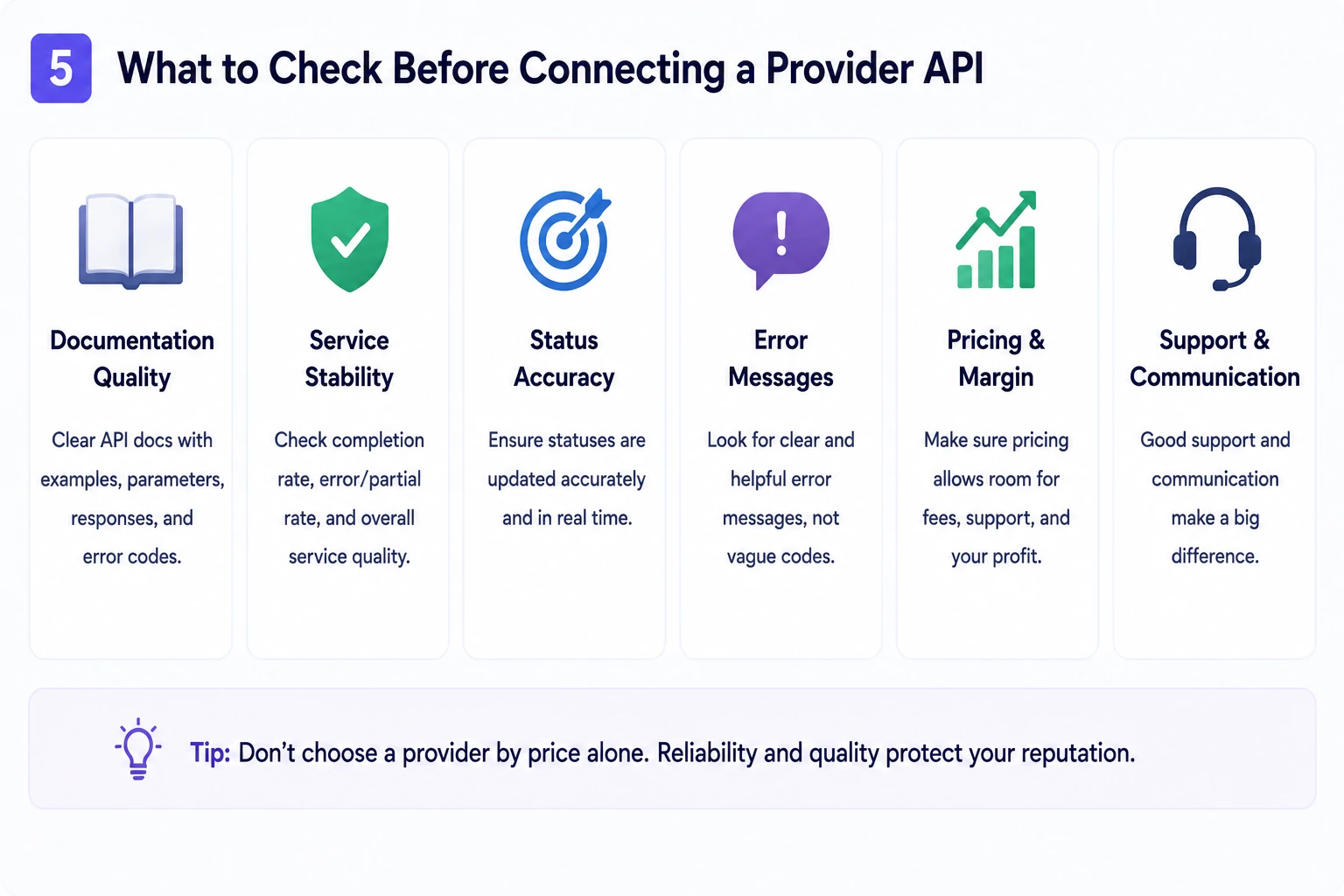
Before connecting any provider through an API, do not look only at price.
A low price can be attractive, but it does not always mean a better business decision.
You should check several important factors.
1. Documentation Quality
Good API documentation should be clear enough for a developer or platform team to understand.
It should explain:
- available endpoints
- required fields
- request examples
- response examples
- error messages
- status values
- balance checks
- service list format.
Poor documentation can make integration harder and increase mistakes.
If the documentation is unclear, expect more technical issues later.
2. Service Stability
Before using a provider heavily, test service stability.
Look at:
- order completion consistency
- cancellation frequency
- partial order frequency
- support response time
- status update accuracy
- service availability.
A provider that looks good at first may create problems if services are unstable.
API integration does not fix poor service quality.
It only automates the connection.
3. Status Accuracy
Status updates must be reliable.
If a provider shows incorrect or delayed statuses, your customers may become confused.
This can increase support requests and reduce trust.
Good status tracking helps users feel in control.
Bad status tracking creates frustration.
4. Error Messages
Clear error messages make troubleshooting easier.
If an API only returns vague errors, it becomes harder to know what went wrong.
Good errors explain the problem.
For example:
- invalid API key
- insufficient balance
- invalid service ID
- quantity too low
- quantity too high
- invalid link format
- service temporarily unavailable.
The clearer the error, the easier it is to fix.
5. Pricing and Margin
Provider pricing affects your margins.
Before connecting a provider, check whether the pricing leaves enough room for:
- payment fees
- support costs
- refunds
- partials
- operational risk
- your profit margin.
Do not choose a provider only because it is cheap.
Choose one that supports a sustainable business model.
6. Support and Communication
Even with API automation, you may still need provider support.
Problems can happen.
Orders can delay.
Statuses can be unclear.
Services can change.
Technical issues can appear.
If provider support is slow or unhelpful, your customers may blame your panel.
Choose providers carefully because their performance affects your reputation.
Common API Integration Mistakes
API integration can be powerful, but many panel owners make mistakes.
Here are some of the most common ones.
Mistake 1: Connecting Too Many Providers Too Early
More providers do not always mean a better panel.
Too many connections can create confusion, inconsistent quality, and more troubleshooting work.
Start simple.
Test one or a few reliable connections before expanding.
Mistake 2: Importing Too Many Services Automatically
A huge service catalog may look impressive, but it can confuse customers.
Do not import everything blindly.
Choose services that match your audience, pricing strategy, and support capacity.
Mistake 3: Ignoring Error Handling
A weak integration may work when everything is normal but fail when something goes wrong.
You need to think about errors before launch.
What happens if the provider balance is low?
What happens if the service is unavailable?
What happens if the order is rejected?
What happens if the customer enters incorrect information?
Good error handling protects the customer experience.
Mistake 4: Not Testing Before Going Live
Never assume an API integration works perfectly without testing.
Before using it with real customers, test:
- creating orders
- checking statuses
- handling failed orders
- checking balance
- invalid inputs
- minimum and maximum quantities
- partial and canceled statuses
- different service types.
Testing helps prevent problems before customers experience them.
Mistake 5: Showing Technical Errors to Customers
Customers should not see raw API errors.
Technical messages can confuse users and make the platform look unprofessional.
Instead, show simple customer-friendly messages.
For example:
“This order could not be processed. Please check the details or contact support.”
The admin can still see more detailed technical logs in the backend.
Mistake 6: Treating API Integration as a Complete Business Strategy
API integration helps automate operations, but it does not replace strategy.
You still need:
- clear positioning
- useful services
- smart pricing
- customer support
- trust signals
- good content
- regular catalog review
- performance monitoring.
An API can help you process orders.
It cannot build your brand for you.
Best Practices for SMM Panel API Integration
A good API integration should support your business, not create more chaos.
Here are practical best practices for panel owners.
1. Start With a Clear Workflow
Before connecting anything, define your ideal order process.
Ask:
- How will customers place orders?
- What information will they provide?
- When will balance be deducted?
- What happens if the order fails?
- How will statuses update?
- What will the customer see?
- What will the admin see?
A clear workflow makes integration easier.
2. Use Clear Service Mapping
Every service in your panel should be connected to the correct provider service ID.
Wrong mapping can create serious problems.
For example, a customer may order one service, but the API sends a different service to the provider.
That creates confusion, refunds, and support pressure.
Always check service mapping carefully.
3. Keep Customer Messages Simple
The customer does not need to understand your API structure.
They need simple, clear information.
Instead of technical language, use plain statuses and helpful explanations.
Good customer-facing statuses may include:
- Pending
- In Progress
- Completed
- Partial
- Canceled.
Keep technical details for admin logs.
4. Monitor Provider Performance
API integration should not be ignored after setup.
Monitor provider performance regularly.
Track:
- completion rate
- average processing time
- failed orders
- partial orders
- support complaints
- price changes
- service availability
- customer feedback.
If a provider creates too many problems, review whether it should remain connected.
5. Protect API Access
API keys and credentials should be treated carefully.
Use secure storage, limit who has access, and replace keys if you suspect they were exposed.
Avoid sharing credentials in public channels or storing them in unsafe documents.
Security is not only a technical concern.
It is part of protecting your business.
6. Keep a Manual Backup Process
Automation is useful, but every business should have a backup plan.
If an API connection fails temporarily, you need to know what to do.
A backup process may include:
- pausing affected services
- notifying customers if needed
- manually reviewing failed orders
- switching provider routes if available
- updating service descriptions
- contacting provider support.
A backup plan helps you stay calm when something goes wrong.
How Nova Panel Fits Into Your Automation Strategy
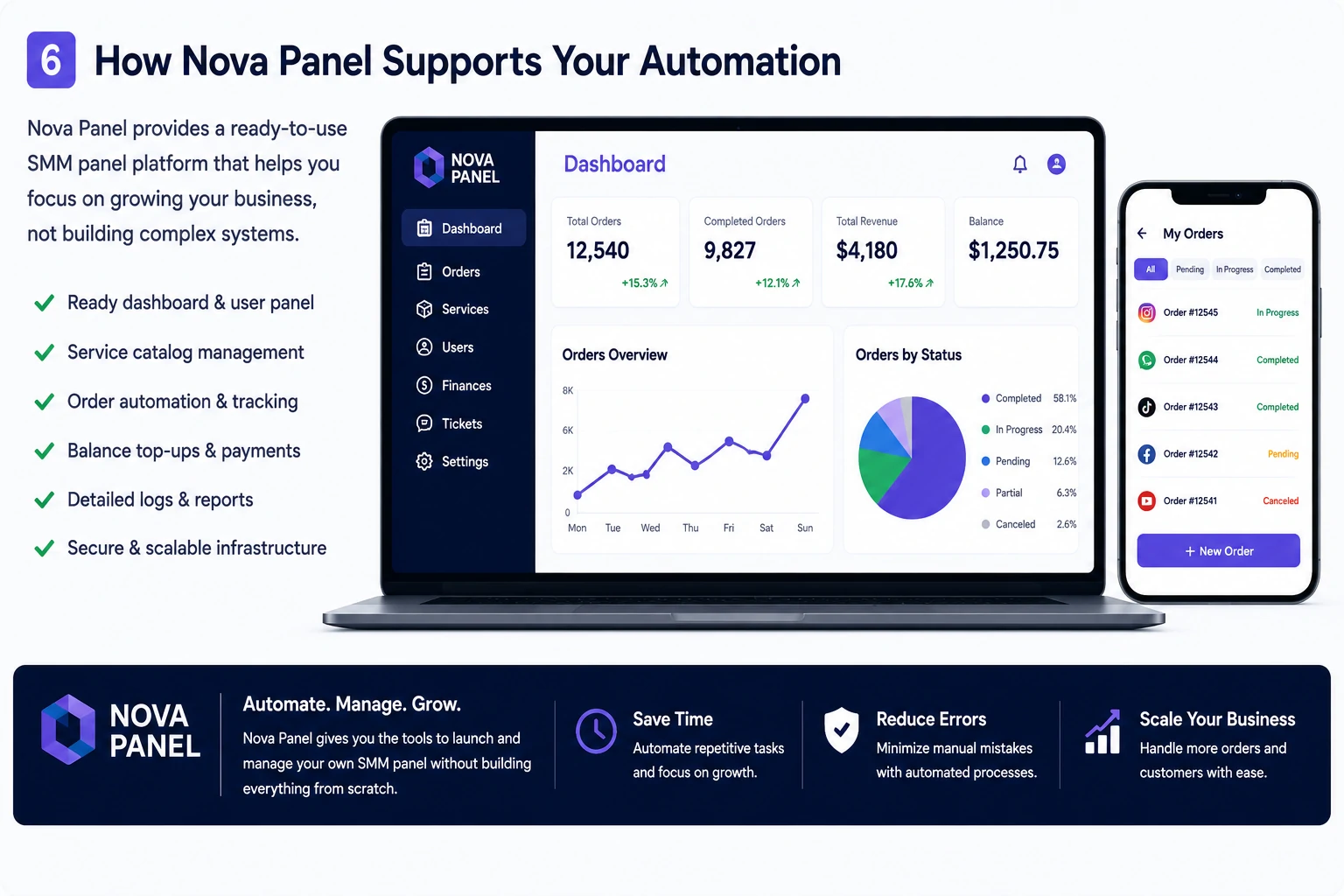
Nova Panel is designed for entrepreneurs who want to launch and manage an SMM panel without building the full system from scratch.
A strong SMM panel needs more than one technical feature.
It needs a complete structure for:
- customer dashboard
- service catalog
- order management
- balance top-ups
- payment flow
- user accounts
- account settings.
API integration is one part of the larger system.
The business also needs clear pricing, organized services, customer trust, support workflows, and a simple user experience.
Nova Panel gives panel owners a structured foundation for building and managing an SMM panel business, so they can focus more on growth, customers, and operations instead of creating every technical layer manually.
Before relying on any API workflow, owners should still test services carefully, review provider quality, and make sure the customer experience stays clear.
Nova Panel gives you the tools to launch and manage your own SMM panel without building everything from scratch.
Final Thoughts
API integration is one of the most important concepts for SMM panel owners to understand.
You do not need to be a developer to understand the business value.
An API allows your panel to communicate with other systems, send orders, receive updates, check statuses, and reduce repetitive manual work.
For panel owners, this means:
- less manual processing
- faster order flow
- better status tracking
- fewer repetitive support questions
- easier scaling
- more time to focus on business growth.
But API integration is not magic.
You still need to choose providers carefully, test services, protect API keys, handle errors properly, monitor performance, and keep your service catalog clean.
The best SMM panel is not just automated.
It is organized, transparent, easy to use, and built around a strong customer experience.
FAQ
What is an API in an SMM panel?
An API is a connection that allows your SMM panel to communicate with another system. It can help send orders, check statuses, retrieve service information, and reduce manual work.
What is an SMM panel API key?
An API key is a unique credential that allows your panel to authenticate requests with another system. It works like a password for system-to-system communication, so it should be stored and protected carefully.
Do I need programming skills to use an SMM panel API?
Not always. Some SMM panel platforms simplify API setup inside the admin area. However, you should still understand the basic business logic: what the API sends, how statuses work, what errors mean, and how provider quality affects your customers.
Why is API integration important for SMM panels?
API integration helps automate order processing, status updates, balance checks, and provider communication. This reduces manual work and helps the panel handle more orders as it grows.
Is API integration always better than manual order management?
Not always. Manual order management may be enough at the very beginning or for very small operations. However, as order volume grows, API integration usually becomes more important because it saves time and improves scalability.
What should I check before connecting a provider API?
Check documentation quality, service stability, pricing, status accuracy, error messages, support quality, and whether the provider fits your business model.
Can I automatically import thousands of services through an API?
Technically, some integrations may allow large service imports. But this is not always a good business decision. A huge catalog can confuse users. It is usually better to curate a clean, focused, and easy-to-understand service catalog.
What are common API integration mistakes?
Common mistakes include connecting too many providers too early, importing too many services automatically, ignoring error handling, not testing before launch, and showing technical errors to customers.
How can Nova Panel help SMM panel owners?
Nova Panel gives panel owners a structured foundation for launching and managing an SMM panel, including key areas such as dashboard, services, orders, balance top-ups, payment flow, user accounts, and account settings.